Linea Sketch 4.4 from The Iconfactory

The Iconfactory Blog

Linea’s interface has been updated to feel right at home on iOS 26 and Liquid Glass. Today’s update emphasizes your canvas while keeping tools just as accessible and intuitive as ever.

Redesigned transformation handles make it more obvious how to scale, rotate, and adjust your selections, reducing friction when refining your work.

Congratulations to my friends at The Iconfactory! 🥳

There are four apps I absolutely love from The Iconfactory; Wallaroo, Tot, Tapestry, and Linea Sketch. I admit I don’t have Linea Sketch because I don’t have a modern iPad, but if I did I could see using it for block diagrams of all kinds.

In fact, I believe, The Iconfactory crew should do Linea Diagram, a Visio-like diagramming app for Mac and iOS. (Yes, I’m biased because I worked on Visio for 10-years. Best job I’ve ever had!)

Then you’d have the Linea family of apps! ❤️

Couple quick updates on Stream for Mac

I fixed the issue with my Context Menu’s not working. Totally stupid move by me — I knew it would be. After my last coding session I changed a property to be “weak” because I thought it was retained somewhere else. Then I committed that change because I needed to pack up and get home. Mistake! That property needed to be retained because it was passed in and the caller created it to be handed off, it was NOT retained. What a rookie move on my part. 🤦🏻

Removed the “weak” last night and now it magically works. Oh, yeah, I also made another change. Instead of using a NIB to create the menu I did it in code and I just like that better. It was extremely straight forward and felt very natrual. Works great! 🥳

A wonderful bouquet of flowers.Next, the app was approved for Testflight last night and I’ve already received some very good feedback! Thanks, John! (No we’re not competitors, John’s Unread is far and away one of the best Mac and iOS feed readers on the market. Go get it and subscribe because his sync service is fantastic!)

Look, I know Stream for Mac isn’t going to be good for everyone and even some of my testers may look at it and say “This is complete crap!” But, it makes me happy working on it and I’m especially thrilled to be making my first Mac app.

I Love RSS!It’s ok to be critical of it! I’d love to get your feedback, so if you’re using it, please share your opinion. If you’d like to see a really rough beta, let me know (if you’re reading this you’ll know how to find me!) and I’ll add you to the list!

Work Note: Stream for Mac

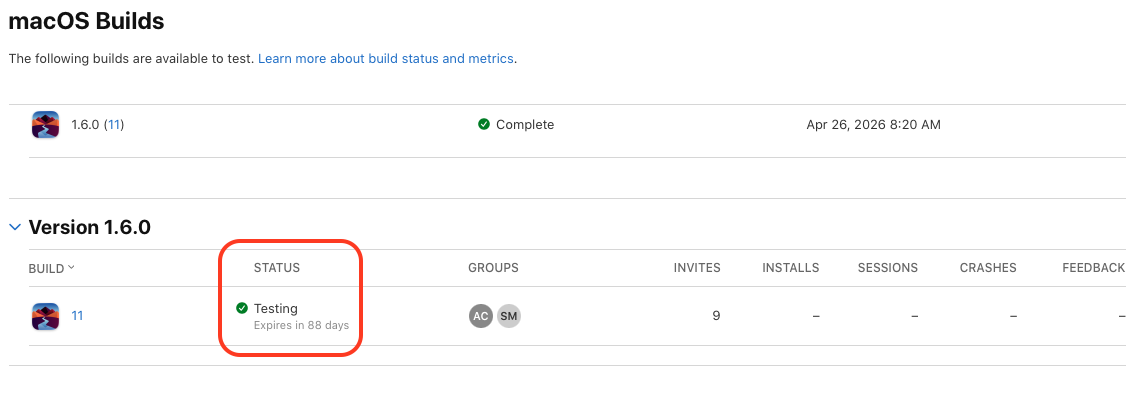
This morning I decided to get TestFlight setup so I could start dropping alpha and beta versions of the app. It didn’t take long, which was really nice, and I’ve submitted a build for Apple to approve for testing. I’d imagine it will take some time to get through the gauntlet since it’s the first version of Stream for Mac. Fingers crossed it doesn’t take long to get through. 🤞🏼

Besides that I added a couple new menu items to the View menu and implemented them.

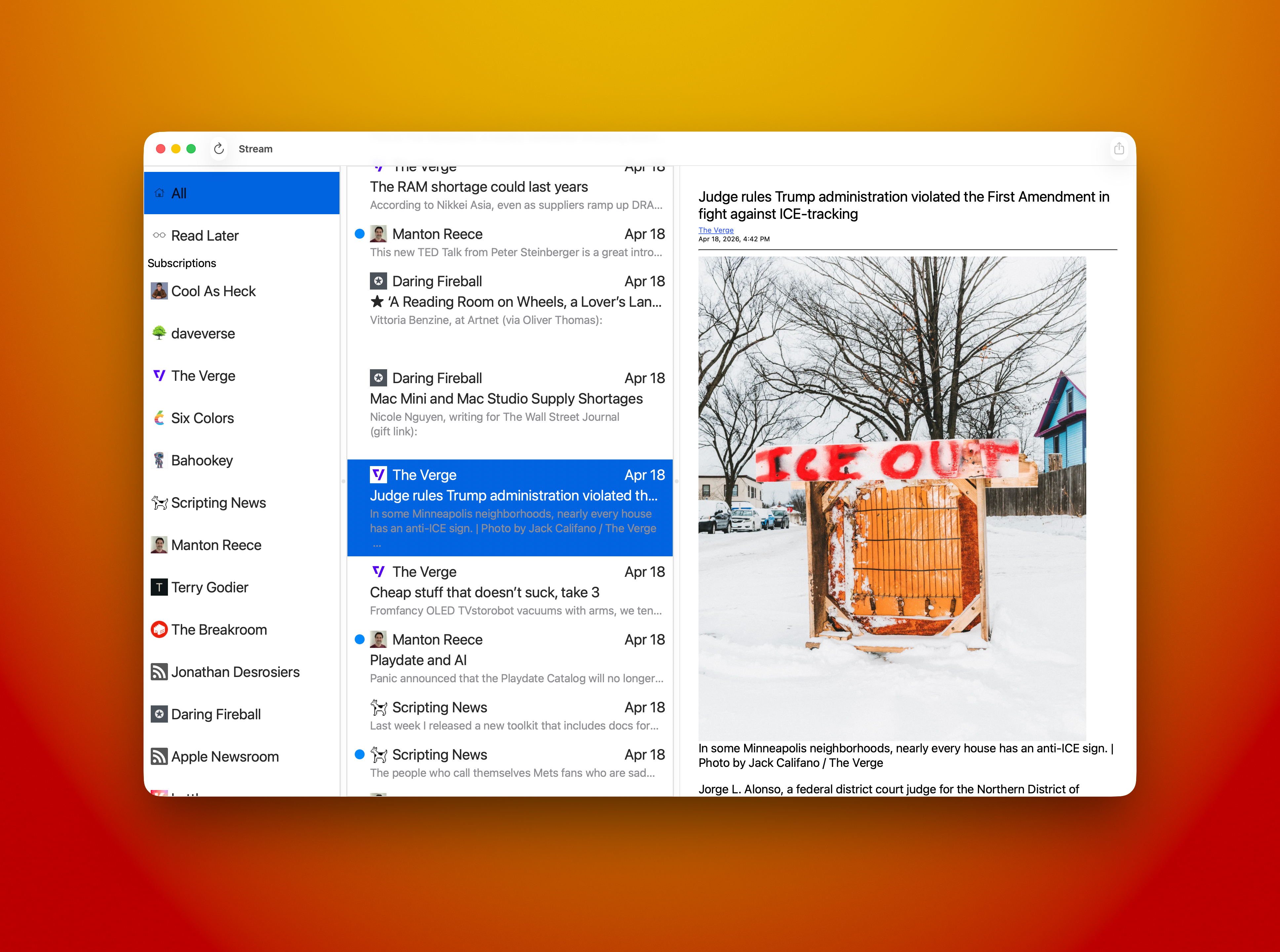
The first was View > Timeline which is meant to present Stream in its two pane layout with a stream of blog posts in the left column and the text of the post in the right pane. I’ve called it Timeline but I don’t like it. It feels backwards. When Timeline is selected the leftmost list of blogs is hidden so you get that two pane view instead of three. It feels backwards because when it’s checked the blog list is hidden. I need to find a better way of presenting it. The functionality works just fine.

The other menu item is called Read/Unread Dots. I need a better name for this as well. What it does is hide or show the read/unread state dots. When I originally shipped stream I didn’t keep track of read state. It was meant to make viewing a more chill experience. I had a lot of folks reach out and ask me to add that read/unread state, so I did. Now I want a way to turn them off. This feature will make its way back to the iOS App as well, probably in a new menu item or as part of Settings. I need to think on it a bit.

Watch out! It's a blog fly! I’d intended to do a bit more but as I was running through the UI testing random stuff I noticed the context menu for the blog list wasn’t working. It worked just fine last weekend but not today. 🤬

I spent the remainder of my work time trying to understand what I’d done wrong. The actions were all hooked up, they just didn’t fire when a menu item was selected. I checked the NSMenuItem and it wasn’t nil and had all the menu items present. It just won’t invoke the associated action.

Depending on how those table view cells are configured I will remove the menu by setting the new menu to nil, but that’s only for the All and Read Later items since the menu items don’t make sense for two things.

The other thing I did was delete my toolbar from the main NIB. I put it back later in the day but it did make me wonder if that change had something to do with my other menus not working. Yeah, it’s a stretch since they’re in separate NIB files. But I sure can’t explain how I broke it. 🤔

Any tips from Mac AppKit experts would be appreciated. 🙏🏼

That’s all for today. It was a good start but that busted menu was a huge time sink and I don’t have an answer for it yet. Maybe I should see if Claude can fix it? 😁

Let’s go!

Picture of the lovely foam art on my mocha with my laptop in the background.

Work Note: Stream for Mac

Today’s progress on Stream for Mac felt great. I was able to replace the Collection View item in the Blog List — leftmost column — with a native NSCollectionViewItem, which was extremely straightforward.

I also added right mouse click menu support so you can do a few actions in your blog list; Mark All Read, Copy Feed Link, View Website, and Unsubscribe. All of the actions work as expected.

Cmd+A now selects the top most item in the list — All — and displays all items from all blogs in the middle column. You can, of course, select that item with the mouse and get the same results.

The middle column adds right mouse menu support for; Copy Link, Open, and Share… All actions work as expected.

I’m showing my hand a little bit with the item called “Read Later.” 😃 Yes, I’m adding an Share Sheet Action that will allow you to not only “Subscribe in Stream” to add a subscription from the blog you’re browsing but a new item will be called “Read Later in Stream” that will stash a reference to any site you’re browsing so you can check it out later. Hey, I really need that for myself! It’s how I collect notes for Saturday Morning Coffee. For now I’m using John Brayton’s excellent Unread to do that for me. Stream needs that support so it’s gonna get it. Both the Mac and iOS versions will have it.

I still have a lot of cleanup and tweaking to do. Mostly in the area of design. I have visual nicities to add and tightening some visual elements up to make my eye happy. It’s getting there.

Watch out! It's a blog fly!Some things that need fixing. Selection of a blog item currently has black text and a blue highlight. The text needs to become white so you can read it easier. I’d also like to round the selection rectangle a bit and give it some inset so it doesn’t look so sharp. They currently look like you could cut yourself on them! Same for the middle column. Selection needs some help and that includes the same rounding and inset work. Using the app shouldn’t result in cuts.

I have some nagivation stuff to add — like using the spacebar to advance an article and jump to the next one when you reach the bottom. I’ve already added vim J and K keys to havigate up and down the middle column. I’d like to be able to navigate the entire thing without taking your hands off of the keyboard. Need to add something for navigating the blog list with the keyboard, maybe D & F? Are there standards for that yet? I’ll see what other Feed Readers use.

I feel very close now. My current plan is to ship the first release without Settings, so no way to tip me. 😄 I will add that support next. For now I’m just really excited to kick it out the door. I can build on what I have from there. Once it gets out there are things I’d like to do for the iOS version and Mac version that will be shared. I need better article parsing, I rely on what the RSS feed provides and if it doesn’t provide the full text of the article, I can’t display it. In the future the app will go to the article and parse the full text if allowed.

I Love RSS!So little time, so many features I’d love to do!

LET’S GO!

Time to work on Stream.

Code by me, coffee by Grit

grug tempted to reach for club and yell “big brain no maintain code! big brain move on next architecture committee leave code for grug deal with!”

I love The Grug Brained Developer. Grug make laugh. 🤣

Work Note: Stream for Mac

I was able to make it to the coffee shop and work on Stream today. I’ve been revisiting how to construct a good AppKit cell view — NSCellView — that does exactly what I want. And I continue to fail.

I’ve tried using constructing a cell using a NIB. It didn’t work as I’d wanted it to and I could never get it right. I abandoned that attempt.

Next I tried doing it in code. I managed to get the same exact results. It didn’t resize properly. I abandoned it.

I decided I should do it in SwiftUI. It only took me an hour or so of tweaks to make it work exactly like I wanted! Yay! 🥳

Next I had to get the little blue read/unread indicator working. I tried a lot of stuff but I couldn’t make it work driving it from an AppKit view (more on this later.)

So, I decided to give AppKit another try. This time using NSGridView in code. I wasn’t able to get the results I was after. So, you guessed it, I abandoned the attempt.

I thought I’d be clever and let Claude do it for me because I’m so darned hung up on it working as an AppKit cell.

I gave Claude a description of what I wanted, pointed it at the working SwiftUI version, told it to use my coding style, and turned it loose. At first glance I was surprised. What it built worked exactly like my AppKit versions. The date wasn’t pinned to the right of the cell view and things didn’t flow properly as I resized the cell. These are the exact same issues my hand built versions had. 😳

I went back to Claude and explained what I wanted to change and why. It went to work and made some tweaks. I thought, this is it!

Nope. Not it. Still has the same issue. The code was tweaked but I got the exact same results. 😳

I was puzzled to say the least.

At that point I was ready to declare I was a completely incompetent developer, throw my computer in a lake, and go hide away in the woods somewhere until I died.

I decided that was a little extreme and decided I’d go back to the working SwiftUI version.

Now, how do I actually get the darned blue read/unread dot to update properly?

I poked around at how Combine and SwiftUI work and how to properly expose and use a property when it updated. This time I went right to my model and made the very simple changes. Those worked as expected. 🥳

AHHHHHH!Now, to be clear, I’d tried some combination of things prior to this attempt and they all failed. Why didn’t I do it this way to start with? Well, I’m dumb, and stubborn, and wanted it to work a certain way, so I kept trying to do it my way. Sure, I used Combine and @Publish and ObservableObject, and the other macro I’m forgetting at the moment, or some other combination of those.

This time I told myself “Just bite the bullet and do it exactly like the documentation says, don’t try to fit it into your model.”

It works. I’m happy about it.

I stubbed out Command+click options on the cell and added some print statements just to make sure it did stuff. It did.

I packaged up my laptop and headed home. Now I sit here tying this up. I’ve been banging my head against a wall off and on since December of last year. I am an idiot and maybe I should quit?

Problem is, I really want to make this app. 😁

Time to hit publish and go mow the lawn, where I’ll think about my next steps for Stream for Mac. For the time being I’m freed of that burden I carried for so long.

Now I can do the features I need to ship the first release.

That is a good feeling. 👍🏼

MacBook Air

Out of curiosity I just configured a new MacBook Air. I’m pretty sure it’s the one I’d buy if I were in the market for a new laptop.

Here’s the configuration:

• 15in.
• Sky Blue
• 32GB Memory
• 1TB SSD
• Included power adapter
• Yearly AppleCare+

Total price: $1,899

My work laptop is a 16in M2 MacBook Pro with 32GB memory and 1TB storage and it’s a great computer. Fast and reliable.

The Air would definitely be enough horsepower for my app development.

Decisions, decisions

Brain in a jarSitting at Grit — my favorite coffee shop — sipping my mocha trying to decide what to work on.

Stream for Mac, Stream for iOS, or Thunder Chicken?

It should be Stream for Mac. I haven’t worked on it in a while because I’ve been working on Thunder Chicken.

I’ve thought about doing a German localization for Stream.

Adding a right mouse action menu to the Mac version of Stream, and whatever else I can complete.

What about having Claude create an NSCellView for me that sizes properly when the column it’s in resizes. I could never get this working properly but did it in SwiftUI rather quickly.

How about completing the first full implementation of a network client for Thunder Chicken? Get posts, create posts, update post, delete posts, etc. I have an abstraction so I can support multiple blogging platforms.

Oh, I forgot about Arrgly. It’s my link shortener that uses YOURLS for its backend. I have a new SwiftUI version of it I need to finish off, just because.

Decisions, decisions.

A Chiseled UI

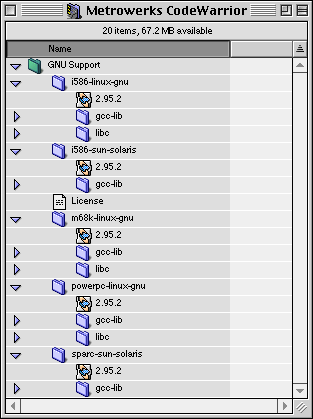
This would be a welcome UI change in macOS. I keep thinking about older operating system UIs and I miss that more chiseled look. I’ve also always loved the color versions of Mac icons and the angle they’re drawn.

I think I’m just feeling nostalgic but I’d love to see a modern take on this older MacOS look.

A screenshot of MetroWerks CodeWarrior on classic MacOS. It’s a real beaut.

I have such a huge list of things I want to add to Stream. Like full page parsing and stripping of formatting, fix some things that annoy me, syncing, connection to feed services like feedbin, recommendations (curated and LLM recommended), a Mac version, and the list goes on and on and on. 😃

I AI'd Yesterday

Brain in a jarI’d done some work on a function last week that determined if a certain permission level was valid for a particular type of user account in our app. The requirements depended on multiple different factors including account type, language, and some other sub data types. I paired with some other devs on the team because they knew way more about the account types than I did, yes, they were convoluted and a few special cases had to be accounted for and even included a check for language spoken and region of a country.

This function had been a lot more straight forward but we were expanding the application to work with more account types so the unit test requirements doubled. When I went to update them I was struggling a bit, remember, I’m using TypeScript and I’m still really bad at it.

After scratching my head for a bit I opened Cline in Visual Studio Code and asked it to “write unit tests for [filename].ts” and it got to to work. It churned away for a while then started outputting new code. After checking some outputs and clicking Save a few times my brand new unit tests were complete.

It worked. Color me shocked. 😳

I can now see doing this for most, if not all, of my unit test needs on this project and probably others. As much as I enjoy writing unit tests, no, seriously, I do enjoy it, this saved me quite a bit of time. Just incredible.

Making Development Easier for Developers

Brent Simmons

And it seems retro in the worst way that we’re still using anything other than a scripting language for most of our code. We should be using something simple and light that can configure toolbars, handle networking callbacks, query databases, manage views, and so on. And maybe with a DSL for SwiftUI-like declarative UI.

Almost none of that code needs to be in a lower-level language like Swift or Objective-C. It really doesn’t. (I say this as a performance junkie!)

It could be in Ruby, Lua, Python, or JavaScript. Better still would be a new language invented specifically for the problem of writing apps, something designed to make the common challenges of app writing easier.

We did have this stuff decades ago. Not for app making in general, sure — but now it’s 25 years later, and a company like Apple could make this real for all its app makers.

Where to start? Let’s start by saying I agree 100% with Brent. Having a built in scripting language with dynamic UI updating and easier ways to build code and UI would be absolutely incredible! And, like Brent says, I’d love to see Apple make this happen.

A hojillion years ago when I worked at Visio we had VBA (Visual Basic for Applications) integrated right into Visio. It was a fantastic way to build custom Add-Ons for Visio. You could embed your VBA solution right into your template or document so folks could invoke it right from the app. This allowed folks to make fancy automation to fit their particular need and do it in a high level scripting language that could control Visio in all kinds of ways! I loved it! I spent a lot of time working on Add-Ons to Visio in C and C++ but I used VBA to test things before implementing them as an Add-On — Add-Ons had the advantage of being usable app wide.

I’m not sure how VBA is used in Visio today but before I left Microsoft had added a way to build your solution code into binary form so it could be signed before including it as a part of your solution package. It was such a marvelous development environment.

Now, if you’ve ever used VBA in Visio, Excel, or Word you know exactly how powerful it is. Could you imagine having access to something like that within your Xcode dev environment that was fully integrated, or even supported like VBA in an application? Yes, it’s a lot of work to make something like VBA work but it is so worth it.

Brent mentions Ruby, Lua, Python, and JavaScript as the scripting languages but I have to say Microsoft’s Visual Basic for Applications is so much easier to understand and use than any of those languages and it was easy to open functionality to it using Microsoft COM, IDispatch specifically, in the app. I know, COM has a bad reputation for being difficult. Yes, like I said earlier, it’s a LOT of work, but it’s so worth it when you can open all that power to your users and yourself! Taking that to the next level, like Brent’s talking about, would be a huge boon to Apple Platform Developers. AppKit, UIKit, SwiftUI, Objective-C, and Swift are still too deep to move quickly. If developers creating code for any of Apple’s platforms ever took some time to use VBA they’d see what I’m talking about. The paradigm is a bit different than they’re used to but, hell, I was so confused when I came to iOS development! They’d get used it after a time.

Building UI and code behind VBA forms is so easy. Drag and drop a UI, double-click on the element you’d like to add code for, and write your code. That’s it. It’s that easy! I would totally embrace this idea for application development on Apple platforms.

You can build at a higher level today using awesome tools like Xojo that give you a very Visual Basic like experience complete with a drag-and-drop forms builder just like Visual Basic!

Psst, did you know that folks have been scripting applications for iOS, complete with dynamic UI updating, with React Native? Yeah, it’s true! I’ve been working on an application like that for the last two years. We’ve almost completely rewritten the application in 100% React Native, which uses JavaScript as its backing language and a way to build UI in a very HTML/CSS manner. Think SwiftUI with web technologies. It works.

I know of many applications using Electron to deliver cross platform apps, like 1Password. They used Rust for mission critical code and put an Electron “front end” on top of it. Microsoft has fully embraced React Native. They like it so much they’re the primary maintainer of React Native for Windows!

Am I saying React Native is a perfect solution? Hell no! It’s a terrible developer experience in my opinion. Most folks use Visual Studio Code — I prefer Nova myself — as their editor and don’t have a nice debugger to fall back on. Nothing is integrated. It’s a bunch of tools losely hung together by duct tape that let you kind of see what’s happening in your app. Hey, if you think console.log is the height of debugging then this environment is for you! 🤣

In the end I, like Brent, would love to see a modern scripting environment that’s embedable or standalone that is fully supported by and used by Apple internally to create applications. The embedded environment is very enticing to me. Something like Visual Basic for stand alone development and Visual Basic for Applications for embedded scripting would be absolutely incredible!

Modern means easy to use UI builder and code behind that is a super simple language like BASIC and on top of it make it easy for third-parites to make extensions to the environment and provide code modules that give developers the power they need for specialized applications.

Look at Xojo. That’s it. Apple, buy it and make a version that’s 100% built for your platforms and is embedable in applications.

Hire Iconfactory

Sean Heber via Mastodon

ChatGPT and other AI services are basically killing @Iconfactory and I’m not exaggerating or being hyperbolical.

Reading this sent chills down my spine.

Iconfactory has a very long history of creating beloved applications and designs for Mac and iOS.

Ollie! The beloved Twitterrific MascotTheir designers craft beautiful interfaces, icons, and other illustrations.

To think they could go away because people are using AI generated slop designs and icons is gut wrenching.

I’m a huge fan of Iconfactory work. I use their apps everyday. Two in particular; Tot and Tapestry.

I’m writing this blog post using Tot. It’s perfect for it. Simple text editor with Markdown support and automatic save that syncs with iCloud. It’s an example of simplicity that is absolutely useful. I’ve been using Tot for years to write all of my blog posts, including Saturday Morning Coffee. ☕️

Tapestry is a new app. It is a new take on feed readers. Sure, it’s a competitor to Stream but it’s beautifully designed and implemented.

I’m a Wallaroo and xScope user and I’ve heard wonderful things about Linea Sketch.

Their craft is second to none.

Stream had the honor of being featured in the App Store in October of 2023. I worked with Iconfactory to create the banner Apple needed for the feature. It was a completely painless process and the results were beautiful and better than I could’ve imagined.

If you need someone to design your app, icon, or other materials, give Iconfactory a shout you will not regret it. ❤️

Migrating from Native to React Native

Something we’ve become very good at, at WillowTree, is migrating native code to React Native incrementally. I’ve been working on a project for the last year-and-a-half to migrate a pretty big application to React Native and we’re not there yet. We’ve finally hit critical mass in the React Native codebase to begin the transition to a full React Native based application.

To start the migration we built bridges to the native iOS and Android applications to handle things like; networking, navigation, analytics, telemetry, and events.

Duct Tape, fixer of all things!Since the native applications had great code written for all of those things we were able to leverage it to build a brand new user interface using React Native. At one point we had a Platform Team who built out the Bridges between React Native and Native. Those teams consisted of two native iOS and Android developers and a React Native team of two. The two React Native developers built up the TypeScript side of things for communication between React Native and Native, leveraging our native bridges.

To make writing new React Native UI easier we had individual teams working on specific parts of the UI by feature. A mono-repo was created so the team could use Expo to quickly iterate the parts of their feature. The React Native Platform team made sure the App Team could mock everything and use the bridges as they’d be used with the native application. It worked out really well.

Since each feature area had its own team we would take their code and make a package out of it. Those NPM packages were then referenced and used in the native iOS and Android applications.

Let’s say we had a Social feature. That feature team would do everything to make that feature work as expected, complete with UI, business logic, and any navigation necessary to complete the feature. That feature would be bundled up into a package and deployed to a private NPM repository.

The native application would reference that package in its packages.json file by its version number and it would be installed using NPM. Once we had it packaged into the native application we would reference it using the supplied Meta React Native library code in each native application. Once the React Native Framework was strapped up it was easy to wrap up each React Native feature and display its UI, where it was completely controlled by the React Native developers.

Hybrid React Native / Native Application

Networking and Models

To supply the React Native code with models ready for consumption we bridged to the native applications since each had already implemented network and data caching code. The React Native bridge allowed the caller to supply all the arguments necessary to make a network request and the bridge code bundled it up, sent the request, received data (or POSTed it), updated any local caches, and forwarded it to the React Native code where it would become a TypeScript model object ready for them to consume. It was some of the first code we created and really opened the door to productivity right away.

I’m going to talk about this from an iOS perspective, since it’s what I know.

This was a bit tricky. Navigation from React Native to Native isn’t a straight line. When creating a React Native feature we first constructed an RCTRootView. This would ask the React Native framework to load a particular feature and host it inside the RCTRootView. Once the React Native code was loaded it was running in its own little sandbox, so to speak. It didn’t have any knowledge of the outside world, except through our native bridging code.

Our navigation bridge was quite simple. It was a single method that allowed code to navigate to a native UI View Controller or to a React Native View Controller based on the name of the UI the developer wanted to navigate to. Yes, the bridging code had to know about every view controller in the application, to an extent. The developers of the iOS and Android code thought ahead and created a really nice set of routing classes. Those were leveraged to display most view controllers, native or react native.

While each feature was self contained this navigation bridge was there to provide the glue that allowed us to display anything we wanted.

One bit that felt weird was the need for the React Native code to know when it had to close itself. The native code built the UI and was hands off at that point but we had to know when to tear down that UI. The React Native code would tell us when it had to go away. Unbalanced, but a compromise that worked beautifully.

Other Stuff

Brain in a jarThere are a few more bridges we built. Each defined in a separate package supplied by our private NPM repository and built into the native applications. I’m not going to get into those now. This post was kind of off the cuff and I could go really deep into the architecture, but that is for another day, if at all. 😄

I will say this. If you were not aware you were looking at a hybrid React Native / Native application you wouldn’t know. Since React Native uses native controls for each platform you are truly getting a native application. Sure it’s using the JavaScript engine from the platform for writing code and sure the UI is described in web technologies, but the Meta React Native framework does all the work to display 100% native UI controls. That’s what makes it difficult to tell the difference.

Electron and React Native are taking over the world

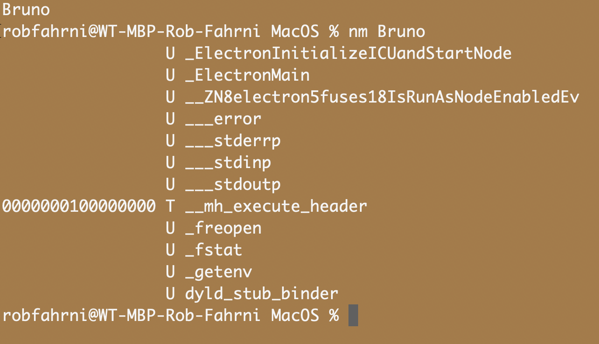
At work we’ve started using Bruno. It’s nice but it’s also an Electron App. I’m already learning React Native on iOS because we are getting a lot of requests for applications written using React Native. We build apps for clients so it makes sense for their apps to be written once so they work on both Android and iOS. They get their money’s worth, I suppose. It’s all about squeezing more out of us. But what does that say about craft? To me it says it doesn’t matter. We’ve fallen into the Accenture trap. We are hired guns who need to pound out code everyday at the fastest possible pace, with high quality of course, and use the lowest common denominator toolset. 🤢🤮

Anyway, I’m feeling a bit spicy this morning for some reason. I really need to improve my SwiftUI and pound all the new concurrency stuff into my tiny brain but I’m torn because to be useful to my company I need to become a React Native expert.

Guess I’ll have to use Stream and Top Secret Project to learn SwiftUI and Swift Concurrency. 👍🏼

Dutch Brothers iOS App

Gotta say it, the Dutch Brothers Coffee app is really well done. It’s beautiful, stable, has a personality, and does exactly what it’s supposed to do. Lets you order and pay for coffee.

I wonder who makes it? Do they do all dev work in house or do they have a studio, like WillowTree, work on it? I’m super curious.

If you know, send a message my way, rob.fahrni@gmail.com.

Thinking of Stream for Mac

The old Voodoo Pad iconI’ve neglected Stream for far too long and I don’t know when I’ll have the gumption to get back on it. Learning AppKit has been a slow and arduous process. I really hate when I suck at something. I know, I know, doing the work will make me better but I just don’t have the energy that 20 something me had to stay up all night learning and doing.

Once of these days I’ll get it finished. It may take years to get there but I’ll get there, I hope. 🤞🏼

Of course finishing off the 1.0 of Stream for Mac would allow me to work on Rooster, which is a new codebase and 100% SwiftUI. 😄

C++? Are you crazy, Rob?

Brain in a jarThere is this weird part of me that wants to go back to writing cross platform C++. All of my cross platform work was for Windows and Linux. The itch has been there since I moved to iOS code — and I spent [two years in between iOS dev jobs working on a cross platform SDK for Pelco’s video encoding, decoding, and recording devices, all in C++. It never made it to Linux but I spent a whole lotta time working on Pelco’s X SDK. That was our version of a cross platform SDK we used internally to build a cool pipeline framework called MPF, or Media Processing Framework.

Why the draw. I’m not sure, but I think it’s probably because it’s the language I know best and I did a lot of work with the Windows API, which was also a strong suit.

I still haven’t, and don’t think I ever will, embrace the Mac like I did Windows. At the time I was a Windows dev the platform was simple, before COM and OLE 2.0. The Windows API was so straightforward.

None of that is true any longer. Not for Windows or C++. I bet I wouldn’t even recognize modern C++. C++ 11 changed A LOT in the language and it’s only advanced since. As for the Windows API, folks still use it but you should be doing something different, like using WinUI 3.

The thing is, I REALLY want to complete Stream for Mac and my new super top secret project: Rooster. Yeah, it’s not so top secret, and I finally gave it a code name, but if you know me you can probably suss out what it would be given my love of blogging.

Stream for Windows built with Swift

Brain in a jarSince we can use Swift to write code for Windows I’m excited to give it a try.

I’m hoping I can bring over all of Stream’s model, network, utility, and view model code over without changes, or perhaps few changes?

The other thing I’m thinking is, I should be able to port my C++ framework for building Windows apps to Swift. That would be something really special and would allow me to do a full version of Stream for Windows. Heck, if my shared code comes right over and I can rebuild my Framework in Swift, I should be able to do a Windows release pretty quickly.

Of course I really need to focus on the Mac version first.

Hey, Microsoft, can you make Visual Studio support Swift as a first class citizen so we can build and debug using it? Please? 🙏🏼

Project Tapestry

Project Tapestry by Iconfactory, promotional image

Craig Hockenberry • Iconfactory

This post will explain the technology behind Project Tapestry and how we tested it as a prototype. We’ll keep this discussion at a fairly basic level: if you’re a web or app developer, you’ll have no problems following along.

And if you think I’m going to describe RSS feeds now, think again! We’ve come up with something completely new.

I’m excitedly looking forward to seeing the final product and I hope they make their stretch goal of bringing it to the Mac. 🤞🏼 Please, go read about Project Tapestry, and if you’re so inclined please support their effort. I backed them early, it was a no brainer for me.

I really wanted to talk about the choice the Iconfactory made to create a highly extensible platform for plugins. It’s a darned great idea! And I love their choice of pushing network requests through Project Tapestry itself as a way to guarantee plugins can’t phish out user data or credentials to exploit later. 👍🏼

As I was reading the post I came across Craig’s mention of the app having a sendRequest method used by the JavaScript code to make network requests. This grabbed my attention and made me realize this is a way better version of a React Native application.

What I mean by that is, React Native is hosted inside a native iOS application framework and uses native iOS controls on its view controllers or its version of a view controller. The JavaScript code drives everything from networking to user interface (it uses UIKit internally) to render content for the user to interact with. This allows developers to write their app using straight web technologies and run it on iOS and Android.

The project I’m currently involved in is an existing eight year old iOS application built with a mix of UIKit and SwiftUI. On the flip side the Android app of the same age is built using Java and Kotlin with a mix of the original XML based UI and modern Jetpack Compose. They’ve both taken very similar and not unexpected paths.

Enter React Native

Something our client wanted to do is integrate React Native into the existing applications. This has been done before by Airbnb and more recently by Shopify. Each with very different outcomes.

So all of that to say, ours has been successful, in my opinion. We’ve been able to fully integrate React Native and carve out a little set of API’s in the native application we expose to the React Native developers to do work the native application is already doing for them for free. Part of which is all the networking calls.

In the Tapestry blog post Craig points out sendRequest. It’s the call they use to handle requests to the internet for the JavaScript plugin. In our application we’ve exposed a makeRequest call that handles doing any type of network request; GET, POST, PUT, PATCH, or DELETE, and returns a Promise to the caller. Hey, sounds like the Tapestry code! 😄

I have it on my todo list to learn JavaScript. It’s been there for years and years because I knew I’d need it at some point. I really need it now. I can’t see React Native projects going away for the WillowTree team. They’re a very popular way for our clients to get cross platform code and get an iOS and Android app out the door simultaneously without having to spend time, money, and effort on two completely separate code bases.

Over the course of our integration work I’ve done a smidge of TypeScript code to allow other TypeScript devs on the team to make calls into the APIs we’ve exposed in the native application.

It’s been fun and I see a place for JavaScript/TypeScript in my native development world.

Project Tapestry is BETTER!

As for what Iconfactory is doing, I think it’s a much better version of what React Native does. It gives them the best of both worlds. A beautiful, hand crafted, fully native UI, that gives JavaScript developers the ability to extend the app. That’s a lovely thing. ❤️

Stream for Mac: Work Note

Brain in a jarI managed to work on Stream for Mac for a little while yesterday. I got a bit confused about how menus operate on the Mac — from a developer standpoint. I’m an old Windows developer of 20 years turned iOS developer in 2009 and now exploring the Mac and AppKit (yeah, I know, it’s old and busted now.) I got hung up on who “owns” the menu in a Mac App. I’d never had to think about it before, now I have a better understanding of how the Mac and first responder work.

I was kind of beating my head against the concept until our internet connection decided to stop working and I was kind of forced to walk away for a bit. That was intimately the key to figuring it out. I asked some questions on the Core Intuition Slack, using my phone, got some great answers to my noob questions, and read about menus and first responder in a book I have available in Kindle. The book I used was Programming Swift! Mac Apps 1 Swift 3 Edition by Nick Smith. I jumped to Chapter 8 Menus, Toolbars, and First Responder and that did the trick. I’m hoping I’ll be able to carve out some time today to put my newfound knowledge to use. 🤞🏼

I have other chores to take care of first. Hopefully they don’t take too long. Heh, they always take too long. 😂

React Native Impressions

RibbitI’m on a project at work using React Native but not in the typical way, which is to say it didn’t start as a React Native project. It’s an exiting app out in the world actively uses by, I’d imagine, tens and tens of thousands of people. Perhaps hundreds of thousands. Bottom line is, it’s a frontline app and is important to our client.

Our client has a large team of React developers and a team dedicated to the design and development of reusable React components for the company. They’ve done an amazing job creating a platform for their devs to build on and would like to have those devs build mobile experiences as well. I can’t blame them. They’re very good at it.

They currently have native iOS and Android apps that are almost ten years old and use various frameworks and technologies. Your typical legacy codebase. That’s nothing new or frightening. All code develops its rough patches over time and as time goes by we go in and turn the soil so to speak. We replace outdated frameworks developed out of necessity with new platform supplied frameworks and our code is more robust and easier to read and maintain, especially for developers coming right out of school.

Brain in a jarWith all that in mind here’s what our client is looking to do. We are building new features in React Native and leveraging much of the internal native code to fetch network data, build models, and return that data to React Native code. The API or Interface to the native code is well defined and implemented on iOS and Android. The React Native team code is the same for both platforms. I’m part of the platform team integrating React Native into the existing app and providing the API/Interfaces to the React Native developers.

Like I said, this is a non-standard way of doing this but it’s been done by others with stories of success and failure. I believe we are on track to have a story of success. It’s not going to be free of bumps along the way but we’re making really great progress and I believe we will hit a steady working state as soon as next week. That means the foundation to strap up and host React Native code is in place and working as expected. Now it’s time to build out the API more thoroughly, driven by our React Native developers need for specific data or business logic. It’s a single app, purpose built, API. The idea is to hide any ugly code on the native side and keep the API to the app clean for the React Native developers.

Cool Bits

One of the extremely cool things about how we’re approaching it is how our React Native devs work.

They work inside of a separate application while they’re developing new views and logic. It allows them to move more quickly and not have to rely on the native apps to update before writing their code. It also means they don’t have to worry about keeping the existing native app building on their computers. That can be a headache, I wish it weren’t, but it can be. More on that in a bit.

How does it work? Well, when you create a brand new React Native project you run some tool to generate the project for you. It creates the scaffolding for your React Native code as well and iOS and Android host app projects complete with the frameworks necessary to build the native host apps. On iOS uses CocoaPods. I don’t know what Android used.

That allows the React Native Developers to run ahead of the platform native developers to build their UI’s.

Ok, so how does that work?

We negotiate with the React Native development team to define an API signature for the native apps. They build a mock version of that in their development host app that matches the agreed upon signature and go about coding.

We build out the platform side to do the true implementation. When we have something to test we pull over a packaged version of the React Native code and give it a spin. If there are problems we work directly with the React Native developers to figure it out. Once it’s ironed out it’s wash, rinse, repeat. We currently have a feature built by WillowTree and one built by our client working in the development host and in the existing native applications.

It’s pretty darned magical when it works! 🧙🏼‍♂️

The Ugly Bits

Getting the React Native frameworks and nuanced build settings and scripts in place has been a bit of a struggle but I think we may finally have all that figured out. But it is painful for a native developer who’s used to opening Xcode, loading the project, hitting build, and it runs. Sure, we may have to use CocoaPods to get started, but that’s rare now since Apple introduced Swift Package Manager, or SPM.

SPM is integrated into Xcode and works really well. I’ve never had an issue with it, knock wood, and went through Stream a couple years back and replaced my use of Carthage and CocoaPods with SPM. It’s been glorious.

This option is, unfortunately, not available to React Native projects AFAIK. That’s fine. CocoaPods works and is familiar.

AHHHHHH!The one really ugly bit, at least to me, is the requirement to use npm. I know web devs are accustomed to using it but it feels really strange and fragile to use these two package managers to be able to build and run an app that includes React Native. I know I’ve run into random issues I can’t explain when node packages change or are added but that’s just me being a big whiny cry baby developer. I understand it well enough to be dangerous but I don’t currently have that deep knowledge I like to have. I’m learning new stuff everyday but I’ve only scratched the surface.

Great! How do you feel about it overall? 🤔

Red sock.I can see why companies are making this choice, especially companies with an army of React developers. It makes complete sense for them to build great UI with their existing developers. And, yes, you can build a great iOS UI with React Native. I’ve witnessed it first hand. If you didn’t know a view was React Native you wouldn’t know the difference in this app. It’s seamless. It’s great in that way.

Angelo Stavrow

but oof — it still feels like I’m working with a business decision, rather than a sharp tool.

I think Angelo’s quote above is a nice TL;DR for me. On the downside I really dislike the tooling. It feels so arcane. I’d love to see something integrated into the Xcode UI for package management and project settings. That’s probably asking a bit much but I’d rather have some do an amazing job of all this scaffolding so I can just hit the build button to run the app.

All that said, it’s still worth using. 👍🏼

I’d like to be an Indie Dev

Steven Beschloss

I love architecture. A beautiful structure—like the iconic Flatiron Building in New York (seen here)— inspires me. It’s not just the aesthetic pleasure of the shape, the materials, the details and its placement, but recognizing how much thinking, planning and executing it took for the original idea to become reality. Unlike other art forms, architecture can’t just be beautiful; it also has to be functional.

The title of Mr. Beschloss’ piece is What Job Do You Wish You Had?.

This is an easy answer for me. I love building software, just like I’m doing now, but I’d like to be doing it independently.

Brain in a jarI would love to wake up every morning and work on Hayseed projects like Stream and unnamed project.

The reality is I don’t have the means to do that. I am bound to my salary and I no longer have my 20 something boulders energy to stay up most of the night working on my dream.

Until retirement I’ll keep hacking away an hour here an hour there on my projects in hope I will be able to break out some day.

Even if someday doesn’t arrive for me I am finding the most joy programming my own apps. No overhead, no meetings, just writing code. That’s just the way I like it. 😃